
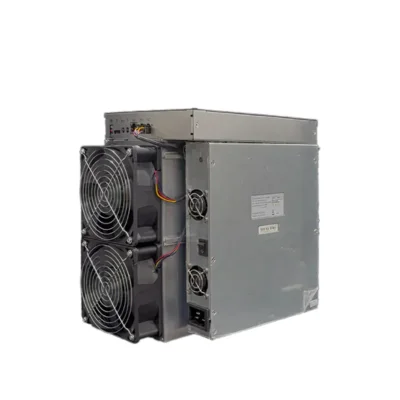
Pinecone Matches INIBOX Pro 2.4GH/s Initverse Miner
$7,399.00
SKU: INIBOXPRO
Categories: Asic Miners, Initverse Miner
Pinecone Matches INIBOX Pro 2.4GH/s InitVerse Miner
The Pinecone Matches INIBOX Pro is a specialized VersaHash ASIC miner developed for InitVerse and the INIChain mining ecosystem. It delivers a maximum listed hashrate of 2.4GH/s while consuming approximately 1,280W. Using the supplied performance ratings, the Pinecone Matches INIBOX Pro achieves a calculated energy efficiency of approximately 0.533J/MH, equivalent to about 533.33J/GH. Its dual-fan air-cooling system, Ethernet interface, and compact chassis make it suitable for dedicated small mining rooms, workshops, hosting environments, and professionally prepared home installations. The Pinecone Matches INIBOX Pro operates exclusively on the VersaHash algorithm. It is not a Bitcoin miner and cannot normally switch to SHA-256, Scrypt, KHeavyHash, Blake3, or unrelated mining algorithms through a software setting. Although its 1,280W demand is lower than that of many industrial Bitcoin miners, the machine still creates significant heat and approximately 70dB of fan noise. Operators should provide a grounded 220V circuit, sufficient airflow, a wired network, compatible mining-pool details, and a supported INI wallet before installation. Browse more equipment in our ASIC miners collection, or explore additional cryptocurrency mining hardware available from Hash Titans.
Pinecone Matches INIBOX Pro Key Features
The Pinecone Matches INIBOX Pro is designed for miners targeting InitVerse and other supported VersaHash workloads. It provides nearly three times the rated hashrate of the standard 850MH/s INIBOX while maintaining a manageable single-unit electrical load.
- Manufacturer: Pinecone
- Model: Matches INIBOX Pro
- Mining algorithm: VersaHash
- Maximum listed hashrate: 2.4GH/s
- Power consumption: Approximately 1,280W
- Calculated efficiency: Approximately 0.533J/MH
- Input voltage: 220V
- Cooling system: Dual-fan air cooling
- Fan quantity: 2
- Listed noise level: Up to approximately 70dB
- Network interface: Ethernet
- Net dimensions: Approximately 270 × 184 × 291mm
- Net weight: Approximately 10.7kg
- Operating temperature: 5–40°C
- Operating humidity: 10–90%, non-condensing
- Primary mineable cryptocurrency: InitVerse (INI)
Pinecone Matches INIBOX Pro Specifications
| Manufacturer | Pinecone |
|---|---|
| Model | Matches INIBOX Pro |
| Mining algorithm | VersaHash |
| Maximum listed hashrate | 2.4GH/s |
| Power consumption | Approximately 1,280W |
| Calculated energy efficiency | Approximately 0.533J/MH |
| Input voltage | 220V |
| Cooling method | Air cooling |
| Cooling fans | 2 |
| Net dimensions | 270 × 184 × 291mm |
| Net weight | Approximately 10.7kg |
| Listed noise level | Up to approximately 70dB |
| Network interface | Ethernet |
| Operating temperature | 5–40°C |
| Operating humidity | 10–90%, non-condensing |
| Primary supported network | InitVerse / INIChain |
| Primary cryptocurrency | INI |
Specification note: Current market listings show minor differences in weight, warranty, package size, environmental limits, and accessory inclusion. Some listings state a net weight of 10.75kg, package weight of 11.89kg, included power supply, and no included power cord. Confirm the delivered accessories and nameplate before installation.
Pinecone Matches INIBOX Pro Mining Overview

Algorithm
VersaHash

Hashrate
2.4GH/s

Power Consumption
Approximately 1,280W
Pinecone Matches INIBOX Pro VersaHash Performance

The Pinecone Matches INIBOX Pro delivers a maximum listed VersaHash hashrate of 2.4GH/s. Because mining hashrate is algorithm-specific, this figure should only be compared with other VersaHash miners rather than SHA-256 or Scrypt machines. Actual pool-side performance may vary according to firmware, machine tolerance, pool latency, network stability, fan condition, ambient temperature, electrical quality, and the current mining configuration. Operators should monitor both the local dashboard and pool-side accepted hashrate. A temporary dashboard peak does not necessarily represent the long-term average received by the pool. Important mining indicators include:
- Real-time and average hashrate
- Accepted and rejected shares
- Hardware-error count
- Fan speed
- ASIC and board temperature
- Pool latency
- Network uptime
- Power stability
A persistent reduction in performance can indicate overheating, restricted airflow, an unstable pool connection, weak power delivery, firmware problems, or a hardware fault.
Pinecone Matches INIBOX Pro 0.533J/MH Efficiency

The Pinecone Matches INIBOX Pro consumes approximately 1,280W while producing 2.4GH/s. Dividing 1,280W by 2,400MH/s gives a calculated efficiency of approximately 0.533J/MH. At nominal power, continuous operation consumes approximately:
- 30.72kWh per day
- 215.04kWh per week
- 921.6kWh per 30-day month
- 11,212.8kWh per year
Estimated monthly miner-only electricity costs are:
- At $0.05/kWh: approximately $46.08
- At $0.08/kWh: approximately $73.73
- At $0.10/kWh: approximately $92.16
- At $0.15/kWh: approximately $138.24
- At $0.20/kWh: approximately $184.32
These figures do not include routers, extraction fans, air conditioning, power-supply losses, or other facility equipment. Mining profitability is not guaranteed. INI price, VersaHash network difficulty, block rewards, pool fees, token liquidity, exchange availability, electricity price, hardware cost, maintenance, and uptime all affect financial performance.
Pinecone Matches INIBOX Pro Cooling and Noise
The Pinecone Matches INIBOX Pro uses two high-speed fans to move cooling air through the chassis. This airflow removes heat generated by the ASIC processors, voltage regulators, controller, and power components. The supplied listing states a noise level of approximately 70dB. This is industrial-level fan noise and may be disruptive in bedrooms, living rooms, quiet offices, and shared residential environments.
Cooling Requirements
- Keep the air intake and exhaust unobstructed.
- Do not operate the miner in a sealed cabinet.
- Leave adequate clearance at both ends.
- Prevent hot exhaust from returning to the intake.
- Use suitable extraction or ducting where necessary.
- Clean dust from the fans and heatsinks regularly.
- Keep the room within the recommended temperature range.
- Stop the miner if either cooling fan fails.
The Pinecone Matches INIBOX Pro converts nearly all consumed electricity into heat. At 1,280W, it creates a continuous room-heating load comparable to a medium electric space heater. Any sound-reduction enclosure must preserve adequate airflow. Blocking the intake or exhaust can increase fan speed, raise operating temperatures, reduce hashrate, and damage components.
Mineable Coin with Pinecone Matches INIBOX Pro

InitVerse and INIChain
The Pinecone Matches INIBOX Pro is designed primarily for the InitVerse and INIChain ecosystem. It processes the VersaHash proof-of-work algorithm and submits shares to a compatible pool or supported mining service.
This specialized miner cannot normally mine Bitcoin because Bitcoin uses SHA-256 rather than VersaHash. It also cannot mine Litecoin or Dogecoin because those networks use Scrypt. Before purchasing the miner, confirm current wallet support, compatible pools, withdrawal requirements, token liquidity, and exchange availability in your region. For technical background on the mining algorithm, review the InitVerse VersaHash documentation.
Pinecone Matches INIBOX Pro Mining-Pool Setup
The Pinecone Matches INIBOX Pro must connect to a pool or mining service that supports VersaHash and the correct InitVerse or INIChain network. Standard Bitcoin, Litecoin, and Kaspa pools cannot accept its shares. Before selecting a mining pool, compare:
- VersaHash support
- Server location
- Pool fees
- Payout method
- Minimum withdrawal threshold
- Wallet-address requirements
- Historical uptime
- Security and account protection
- Backup server availability
Where the dashboard permits multiple pool addresses, configure primary, secondary, and tertiary servers. A backup pool may reduce downtime if the main server becomes unavailable. Pool availability for newer mining algorithms can change quickly. Verify that a pool is active and processing valid payouts before committing the miner to long-term operation.
Pinecone Matches INIBOX Pro Electrical Requirements
The Pinecone Matches INIBOX Pro uses a listed input voltage of 220V and consumes approximately 1,280W. Its estimated current draw at nominal load is approximately 5.82A at 220V. Although this load may be manageable on a correctly prepared circuit, electrical compatibility should not be assumed. The supplied power cable, connector, grounding, circuit capacity, and local electrical standards must all be considered.
- Use a properly grounded 220V circuit.
- Confirm the power-supply nameplate before startup.
- Use a correctly rated power cord and connector.
- Do not use damaged cables or loose outlets.
- Avoid overloaded extension leads and power strips.
- Keep electrical connections away from moisture.
- Use suitable overcurrent and surge protection.
- Consult a qualified electrician when compatibility is uncertain.
Some listings state that the power supply is included but the power cord is not. Confirm whether a suitable 16A C19-type cable or another regional cable is required before delivery.
Pinecone Matches INIBOX Pro Installation Guide
Before installing the Pinecone Matches INIBOX Pro, prepare a stable Ethernet connection, compatible 220V circuit, VersaHash pool details, supported INI wallet, and sufficient room ventilation.
- Inspect the miner and packaging for shipping damage.
- Confirm the model and electrical ratings on the nameplate.
- Place the miner on a stable, nonflammable surface.
- Leave adequate clearance around the air intake and exhaust.
- Verify that both fans can rotate freely.
- Connect the Ethernet cable to the router or network switch.
- Attach the correctly rated power cord.
- Connect the miner to the prepared electrical circuit.
- Power on the miner and allow it to initialize.
- Locate the miner’s IP address through the router or discovery tool.
- Open the management interface in a browser.
- Change the default login credentials where supported.
- Enter the compatible VersaHash pool URL.
- Add the wallet address or worker credentials.
- Configure backup pool addresses.
- Save the settings and restart mining where required.
- Monitor hashrate, temperature, fan speed, and accepted shares.
During commissioning, watch the Pinecone Matches INIBOX Pro for repeated restarts, fan alarms, high temperature, rejected shares, power instability, and abnormal sound.
Pinecone Matches INIBOX Pro Maintenance
Routine maintenance helps the Pinecone Matches INIBOX Pro maintain stable airflow and reduces preventable downtime.
- Check hashrate and accepted shares daily.
- Review fan speed and temperature readings.
- Clean dust from fan guards and heatsinks.
- Inspect intake filters where installed.
- Check Ethernet and power connections.
- Look for heat discoloration around plugs and sockets.
- Keep the mining area dry and ventilated.
- Install firmware only from a trusted source.
- Save pool and network settings before updates.
- Disconnect power before physical cleaning.
Do not spray liquid cleaners into the miner. When using compressed air, hold the fan blades in place to prevent excessive spinning that could damage the fan bearings or electronics. Additional product information is available from the Pinecone Matches INIBOX Pro product listing.
Why Choose the Pinecone Matches INIBOX Pro?
The Pinecone Matches INIBOX Pro may suit miners who specifically want higher VersaHash performance than the standard INIBOX without installing a multi-kilowatt industrial Bitcoin miner.
- 2.4GH/s VersaHash mining output
- Approximately 1,280W power consumption
- Calculated 0.533J/MH efficiency
- Dedicated InitVerse and INIChain support
- Dual-fan air cooling
- Standard Ethernet connectivity
- Compact 270 × 184 × 291mm chassis
- Approximately 10.7kg net weight
- Lower electrical load than many Bitcoin ASIC miners
- Designed for specialized VersaHash mining
Its main limitation is algorithm dependence. If VersaHash mining revenue, pool access, wallet support, or token liquidity declines, the Pinecone Matches INIBOX Pro cannot normally be redirected to unrelated proof-of-work algorithms. Browse more cryptocurrency ASIC miners to compare the Pinecone Matches INIBOX Pro with other specialized mining machines.
Pinecone Matches INIBOX Pro Frequently Asked Questions
What is the Pinecone Matches INIBOX Pro?
The Pinecone Matches INIBOX Pro is a specialized VersaHash ASIC miner designed primarily for InitVerse and INIChain mining.
What is its maximum hashrate?
The maximum listed hashrate is 2.4GH/s.
How much power does it consume?
The listed power consumption is approximately 1,280W.
What is its calculated efficiency?
At 2.4GH/s and 1,280W, the calculated efficiency is approximately 0.533J/MH.
Which algorithm does it mine?
The miner operates on the VersaHash algorithm.
Which cryptocurrency does it mine?
It is designed primarily for INI within the InitVerse and INIChain ecosystem.
Can it mine Bitcoin?
No. Bitcoin uses SHA-256, while the Pinecone Matches INIBOX Pro is specialized for VersaHash.
Can it mine Litecoin or Dogecoin?
No. Litecoin and Dogecoin use the Scrypt algorithm.
How does it connect to the network?
The miner uses a wired Ethernet connection.
How many cooling fans does it have?
The supplied specification lists two cooling fans.
How loud is it?
The listed noise level is up to approximately 70dB, although actual sound varies with fan speed, ambient temperature, and machine condition.
What voltage does it require?
The supplied specification lists 220V.
Can it run from a standard 110V outlet?
No. The listed electrical requirement is 220V.
What are its dimensions?
The listed dimensions are approximately 270 × 184 × 291mm.
How much does it weigh?
The supplied net weight is approximately 10.7kg, while some listings state 10.75kg.
How much electricity does it use daily?
At 1,280W, continuous operation consumes approximately 30.72kWh every 24 hours.
Is the Pinecone Matches INIBOX Pro suitable for home mining?
It may be used at a professionally prepared property with compatible 220V power, ventilation, Ethernet, and noise management. Its approximately 70dB sound level makes it unsuitable for normal living spaces.
Is the Pinecone Matches INIBOX Pro profitable?
Profitability is not guaranteed. It depends on INI price, VersaHash difficulty, block rewards, pool fees, electricity cost, hardware price, exchange access, liquidity, and uptime.
Buy Pinecone Matches INIBOX Pro VersaHash Mining Hardware
The Pinecone Matches INIBOX Pro delivers 2.4GH/s of VersaHash mining performance while consuming approximately 1,280W. Its calculated 0.533J/MH efficiency, dual-fan air cooling, Ethernet connectivity, and compact chassis make it a specialized solution for InitVerse and INIChain miners. Before ordering, confirm pool availability, wallet support, exchange access, delivered accessories, electrical compatibility, warranty coverage, airflow requirements, and current mining economics. Visit Hash Titans to compare the Pinecone Matches INIBOX Pro with other specialized ASIC mining machines.
Additional information
| Brands |
|---|
Reviews
There are no reviews yet.