
Description
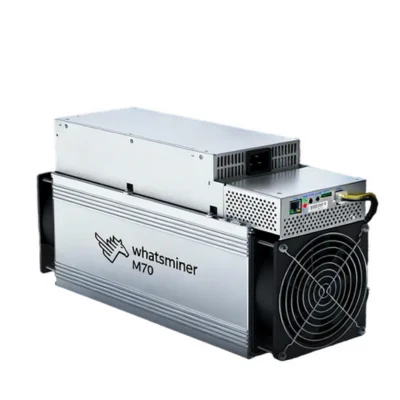
Whatsminer M70S+ 244TH/s Bitcoin ASIC Miner
The Whatsminer M70S+ is a high-performance SHA-256 ASIC miner designed for professional Bitcoin mining. The configuration covered on this page delivers approximately 244TH/s of hashrate while consuming around 3,140W.
Based on those submitted values, the Whatsminer M70S+ provides calculated power efficiency of approximately 12.87J/TH. This efficiency represents a major improvement over many older air-cooled Bitcoin miners that operate above 20J/TH, 30J/TH or even 50J/TH.
The Whatsminer M70S+ uses wired Ethernet, dual high-speed cooling fans, an integrated industrial power supply and a compact air-cooled chassis. It is intended for mining farms, professional hosting facilities, workshops and dedicated equipment rooms with strong ventilation and properly rated electrical infrastructure.
Although the Whatsminer M70S+ is relatively efficient, it still draws more than 3kW continuously and converts most of that electrical energy into heat. It is therefore unsuitable for ordinary bedrooms, offices or poorly ventilated residential spaces.
Before purchasing, verify the exact model name, production batch, factory hashrate, listed efficiency, power consumption, PSU model, firmware, warranty and shipping origin. M70-series configurations may differ by seller, production batch and regional availability.
Bitcoin mining revenue and return on investment are not guaranteed. Earnings can change with Bitcoin price, mining difficulty, total network hashrate, transaction fees, pool performance, electricity pricing and facility expenses.
Browse additional Bitcoin miners, compare more ASIC miners, or visit Hash Titans for professional cryptocurrency-mining equipment.
Whatsminer M70S+ Key Features
The Whatsminer M70S+ combines modern SHA-256 efficiency, Ethernet management, industrial air cooling and compact mining-farm deployment.
- Manufacturer: MicroBT
- Product family: WhatsMiner M70 series
- Model: M70S+
- Full product name: Whatsminer M70S+
- Miner type: Air-cooled SHA-256 ASIC miner
- Primary cryptocurrency: Bitcoin
- Submitted hashrate: Approximately 244TH/s
- Submitted power consumption: Approximately 3,140W
- Calculated efficiency: Approximately 12.87J/TH
- Network connection: Ethernet
- Cooling method: Industrial forced-air cooling
- Common fan count: Two
- Reported noise: Approximately 75dB
- Platform dimensions: Approximately 430 × 155 × 226mm
- Platform weight: Approximately 13.5kg
- Electrical input: AC 220–240V
- Power cable: IEC C19 rated at least 16A
- Working temperature: Approximately −5°C to 35°C
- Recommended location: Mining farm, hosting site or dedicated mining room
Whatsminer M70S+ Specifications
| Manufacturer | MicroBT |
|---|---|
| Product family | WhatsMiner M70 series |
| Model | Whatsminer M70S+ |
| Mining algorithm | SHA-256 |
| Primary network | Bitcoin |
| Submitted hashrate | Approximately 244TH/s |
| Submitted power consumption | Approximately 3,140W |
| Calculated efficiency | Approximately 12.87J/TH |
| Cooling system | Industrial forced-air cooling |
| Reported fan count | Two |
| Reported noise | Approximately 75dB |
| Network interface | Ethernet |
| Dimensions | Approximately 430 × 155 × 226mm |
| Weight | Approximately 13.5kg |
| Electrical input | AC 220–240V |
| Power cable | IEC C19 rated at least 16A |
| Working temperature | Approximately −5°C to 35°C |
| Reported humidity | Approximately 5% to 95%, non-condensing |
| Warranty | Depends on seller terms and applicable manufacturer coverage |
Configuration note: The 244TH/s and 3,140W values describe the submitted Whatsminer M70S+ configuration. Buyers should verify these numbers against the factory label, invoice, firmware dashboard and measured wall consumption.
The chassis dimensions, weight, electrical input, cable and temperature information are based on the official M70S air-cooled platform. Confirm that the exact M70S+ production batch uses the same hardware arrangement before installation.
Whatsminer M70S+ Mining Performance
The Whatsminer M70S+ performs approximately 244 trillion SHA-256 calculations every second under nominal conditions.
Actual local hashrate may move above or below 244TH/s because of firmware, power mode, ambient temperature, input voltage, airflow, fan condition, PSU performance and hashboard health.
Pool-side accepted hashrate may also differ from the local dashboard because of network latency, rejected shares, stale shares, pool-server location and normal short-term statistical variation.
Factors That Affect Hashrate
- Firmware version
- Selected operating mode
- Ambient temperature
- Intake-air temperature
- Exhaust-air recirculation
- Dust accumulation
- Fan condition
- Power-supply stability
- Hashboard health
- Ethernet reliability
Operators should compare the local Whatsminer M70S+ dashboard with average pool-side accepted hashrate over several hours rather than relying on a short peak.
Important Monitoring Values
- Real-time hashrate
- Average hashrate
- Pool-side hashrate
- Accepted shares
- Rejected shares
- Stale shares
- Hashboard temperatures
- Fan speeds
- PSU status
- Network uptime
Whatsminer M70S+ Power Efficiency
The submitted efficiency of the Whatsminer M70S+ is calculated as follows:
3,140W ÷ 244TH/s = approximately 12.87J/TH
This means the miner consumes approximately 12.87 joules of electricity for each terahash of SHA-256 processing delivered per second.
Lower joules-per-terahash generally provide better electricity efficiency. However, hardware price, repairability, uptime, warranty and facility costs must also be considered.
Efficiency Comparison Factors
- Total hashrate
- Power consumption
- Joules per terahash
- Hardware purchase price
- Electricity rate
- Cooling cost
- Hosting fees
- Expected uptime
- Repair availability
- Resale value
The Whatsminer M70S+ offers better nominal efficiency than the submitted 226TH/s M70S configuration using the same 3,140W power figure.
Whatsminer M70S+ Electricity Consumption
At a continuous nominal load of 3,140W, the Whatsminer M70S+ consumes approximately:
- 75.36kWh per day
- 527.52kWh per week
- 2,260.8kWh per 30-day month
- 27,506.4kWh per year
Estimated Monthly Electricity Costs
- At $0.03/kWh: approximately $67.82
- At $0.05/kWh: approximately $113.04
- At $0.08/kWh: approximately $180.86
- At $0.10/kWh: approximately $226.08
- At $0.15/kWh: approximately $339.12
- At $0.20/kWh: approximately $452.16
- At $0.30/kWh: approximately $678.24
Actual wall consumption may differ because of operating mode, input voltage, PSU efficiency, firmware, fan speed and room temperature.
Use a correctly rated power meter or monitored PDU to measure the real consumption of the Whatsminer M70S+.
Whatsminer M70S+ Profitability Factors
The profitability of the Whatsminer M70S+ depends on current Bitcoin mining revenue and complete operating expenses.
Important factors include:
- Current Bitcoin price
- Bitcoin network difficulty
- Total Bitcoin network hashrate
- Current block subsidy
- Transaction-fee revenue
- Mining-pool fees
- Rejected-share percentage
- Electricity rate
- Cooling and ventilation cost
- Hosting fees
- Hardware purchase price
- Maintenance and repairs
Daily Electricity-Cost Examples
- At $0.03/kWh: approximately $2.26 per day
- At $0.05/kWh: approximately $3.77 per day
- At $0.08/kWh: approximately $6.03 per day
- At $0.10/kWh: approximately $7.54 per day
- At $0.15/kWh: approximately $11.30 per day
- At $0.20/kWh: approximately $15.07 per day
Calculate net income by subtracting electricity, ventilation, mining-pool fees, hosting and maintenance from current gross mining revenue.
Do not rely on fixed earnings or guaranteed payback claims when evaluating the Whatsminer M70S+.
Whatsminer M70S+ SHA-256 Compatibility
The Whatsminer M70S+ is built for SHA-256 proof-of-work mining. Bitcoin mining software prepares block-header work and sends it with a target threshold to ASIC hardware.
The miner performs repeated SHA-256 calculations while searching for qualifying results. When connected to a pool, it submits lower-difficulty shares that prove the miner completed assigned work.
The machine may support other SHA-256 networks when compatible mining pools and firmware are available. It cannot mine unrelated algorithms such as:
- Scrypt used by Litecoin and Dogecoin
- kHeavyHash used by Kaspa
- RandomX used by Monero
- BLAKE3 used by Alephium
- NexaPow used by Nexa
- Ethash-family algorithms
Review the official WhatsMiner website, the official WhatsMiner support portal, and the official Bitcoin mining documentation.
Whatsminer M70S+ Mining-Pool Configuration
The Whatsminer M70S+ normally connects to a compatible SHA-256 mining pool through wired Ethernet.
Pool setup typically requires:
- A compatible Stratum server address
- A Bitcoin payout address or pool account
- A worker name
- A pool password
- Secondary and tertiary backup pools
Pool Selection Checklist
- Pool fee
- Payout method
- Minimum payout threshold
- Regional server availability
- Historical uptime
- Rejected-share performance
- Worker-monitoring tools
- Account-security options
- Customer support
- Pool hashrate concentration
After setup, confirm that the Whatsminer M70S+ displays an active pool connection and begins submitting accepted shares.
Whatsminer M70S+ Electrical Requirements
The M70 air-cooled platform uses AC 220–240V input and an IEC C19 power cable rated at least 16A.
Approximate current at a 3,140W load is:
- Approximately 14.27A at 220V
- Approximately 13.65A at 230V
- Approximately 13.08A at 240V
These simplified calculations do not account for power factor, PSU losses or startup behaviour.
Electrical Preparation
- Correct 220–240V power supply
- Proper equipment grounding
- Appropriately rated circuit breaker
- IEC C19-compatible connection
- Cable rated at least 16A
- Mining-rated PDU
- Secure electrical connections
- Accessible emergency disconnect
- Compliance with local electrical codes
Do not operate the Whatsminer M70S+ from a lightweight extension cord, damaged receptacle, overloaded circuit or unsuitable residential wiring.
A qualified electrician should inspect the installation when the circuit was not specifically designed for continuous mining equipment.
Whatsminer M70S+ Cooling and Noise
The Whatsminer M70S+ is an air-cooled ASIC miner that converts approximately 3,140W of electricity into continuous heat.
The mining room must provide sufficient cool intake air and remove warm exhaust without allowing hot air to return to the miner.
Reported noise is approximately 75dB, although actual sound depends on fan speed, ambient temperature, airflow restrictions, dust accumulation and operating mode.
Cooling Recommendations
- Keep the intake and exhaust unobstructed.
- Separate cool intake air from hot exhaust.
- Use exhaust ducting where appropriate.
- Provide strong room-level air exchange.
- Avoid enclosed cabinets without extraction.
- Remove dust from fans and heatsinks.
- Monitor intake-air temperature.
- Monitor hashboard temperatures.
- Prevent moisture and condensation.
- Do not place the miner in a bedroom or occupied office.
A mining farm, detached garage, workshop or professional hosting facility is generally more suitable for the Whatsminer M70S+ than an ordinary living space.
Whatsminer M70S+ Installation Guide
- Inspect the package for shipping damage.
- Confirm that the factory label states M70S+.
- Verify the listed hashrate and efficiency.
- Confirm the power requirement.
- Inspect the fans, PSU and electrical connectors.
- Confirm that the circuit is correctly rated.
- Place the miner in a ventilated location.
- Connect the Ethernet cable.
- Connect the IEC C19 power cable securely.
- Energize the electrical circuit.
- Locate the miner’s IP address.
- Open the management interface.
- Change the default password.
- Enter the primary mining-pool address.
- Add the pool account and worker name.
- Configure backup mining pools.
- Save and apply the settings.
- Monitor hashrate, temperatures, fans and wall power.
During initial operation, monitor the Whatsminer M70S+ for unstable hashrate, missing hashboards, repeated restarts, unusual fan sounds, overheated connectors and excessive rejected shares.
Whatsminer M70S+ Maintenance
Routine maintenance helps the Whatsminer M70S+ maintain reliable cooling, network connectivity and accepted pool performance.
- Inspect the intake and exhaust fans.
- Remove accumulated dust safely.
- Monitor hashboard temperatures.
- Inspect the IEC C19 power connection.
- Check the PSU for overheating.
- Inspect Ethernet cables and switches.
- Compare local and pool-side hashrate.
- Review rejected and stale shares.
- Back up mining-pool settings.
- Use only compatible official firmware.
- Disconnect and isolate power before servicing.
Use official WhatsMiner technical resources for firmware, tools and maintenance information.
Whatsminer M70S+ Model Comparison
The Whatsminer M70S+ is part of MicroBT’s M70 generation and should be distinguished from the M70 and M70S configurations.
| Model | Submitted Hashrate | Submitted Power | Calculated Efficiency |
|---|---|---|---|
| WhatsMiner M70 | Approximately 214–220TH/s | Configuration dependent | Approximately 14.5J/TH |
| WhatsMiner M70S | Approximately 226TH/s | Approximately 3,140W | Approximately 13.9J/TH |
| Whatsminer M70S+ | Approximately 244TH/s | Approximately 3,140W | Approximately 12.87J/TH |
Based on the submitted ratings, the M70S+ delivers higher hashrate and better efficiency than the 226TH/s M70S while using the same nominal power.
Confirm every model using the factory label and dashboard rather than chassis appearance alone.
Whatsminer M70S+ Buying Considerations
Check Before Ordering
- Exact M70S+ model label
- Factory hashrate rating
- Factory efficiency rating
- Listed wall power
- New, used or refurbished condition
- Hashboard condition
- Fan condition
- PSU condition
- Control-board condition
- Firmware version
- Repair history
- Power-cable inclusion
- Seller warranty
- Return policy
- Shipping insurance
Request a recent dashboard screenshot or test video showing the exact Whatsminer M70S+ hashrate, temperatures, fan speeds, uptime and pool-side performance.
Contact Hash Titans to check availability, machine configuration, pricing, shipping and purchase support.
Whatsminer M70S+ Warranty and Shipping
Warranty coverage depends on the seller, purchase channel, production batch and applicable MicroBT after-sales policy.
- Confirm the warranty period in writing.
- Ask who handles technical repairs.
- Review the return period.
- Confirm covered failures.
- Verify the shipping warehouse.
- Review shipping-insurance coverage.
- Check customs duties and import taxes.
- Request protective packaging.
- Inspect the miner immediately after delivery.
- Record shipping damage before powering it on.
Damage caused by unsuitable voltage, insufficient ventilation, unauthorized modifications, incompatible firmware or improper repairs may not be covered.
Whatsminer M70S+ Frequently Asked Questions
What is the Whatsminer M70S+?
The Whatsminer M70S+ is an air-cooled SHA-256 ASIC miner designed for professional Bitcoin mining.
What is its submitted hashrate?
The configuration covered on this page is listed at approximately 244TH/s.
How much power does it use?
The submitted power rating is approximately 3,140W.
What is its calculated efficiency?
At 244TH/s and 3,140W, calculated efficiency is approximately 12.87J/TH.
Can M70S+ configurations differ?
Yes. Buyers should verify the exact factory label, invoice, dashboard and wall-power rating.
Which algorithm does it mine?
The miner uses the SHA-256 proof-of-work algorithm.
Can it mine Bitcoin?
Yes. Bitcoin is its primary intended mining network.
Can it mine Litecoin or Dogecoin?
No. Litecoin and Dogecoin use Scrypt rather than SHA-256.
How much electricity does it use daily?
At 3,140W, continuous operation consumes approximately 75.36kWh per day.
What does electricity cost at $0.10 per kWh?
Electricity costs approximately $7.54 per day or $226.08 per 30-day month.
Is the Whatsminer M70S+ profitable?
Profitability is not guaranteed. Bitcoin price, difficulty, electricity, pool fees, miner cost and uptime all affect results.
Is it suitable for home mining?
It is usually unsuitable for normal living spaces because of its industrial noise, heat and continuous 3.14kW load.
What voltage does it require?
The M70 air-cooled platform uses approximately AC 220–240V.
What power cable does it use?
The platform uses an IEC C19 power cable rated at least 16A.
Does it require Ethernet?
Yes. A wired Ethernet connection is normally required.
What is the reported noise level?
The submitted specification lists approximately 75dB, although actual sound varies with fan speed and room temperature.
Can it run on a household extension cord?
No. Lightweight household extension cords are unsuitable for a continuous load above 3kW.
Can I install third-party firmware?
Unofficial firmware may affect stability, security, electricity use and warranty coverage. Use official model-compatible firmware.
Where can I buy the Whatsminer M70S+?
You can contact Hash Titans to confirm stock, configuration, pricing, shipping and seller support.
Buy Whatsminer M70S+ Bitcoin Mining Hardware
The Whatsminer M70S+ configuration covered here delivers approximately 244TH/s while consuming around 3,140W, producing calculated efficiency of about 12.87J/TH.
Its strong efficiency, compact air-cooled platform and Ethernet management make it suitable for professional Bitcoin mining facilities with correctly rated 220–240V power and effective ventilation.
Before ordering, verify the exact factory model, hashrate, efficiency, wall power, PSU, firmware, power cable, warranty and shipping terms.
Visit Hash Titans to compare the Whatsminer M70S+ with other Bitcoin ASIC miners.
Reviews
There are no reviews yet.