Description
Bitaxe Touch 1.6TH/s Touchscreen Bitcoin Miner
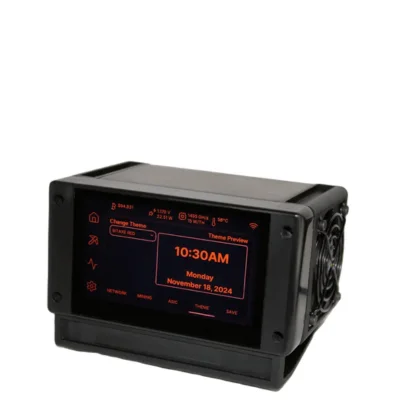
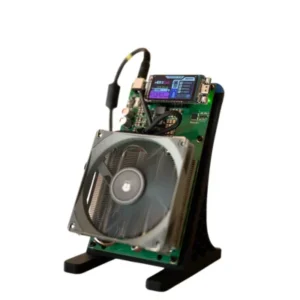
The Bitaxe Touch is a compact, open-source SHA-256 Bitcoin miner that combines Bitaxe mining hardware with an interactive touchscreen dashboard. This seller-supplied configuration produces up to 1.6TH/s while consuming approximately 22W, making it suitable for home mining, solo-mining experiments, education and Bitcoin hardware development.
Unlike a conventional Bitaxe that is managed entirely through a browser, the Bitaxe Touch includes an 800 × 480 display that can show live hashrate, temperature, power consumption, mining status and other useful information directly on the device. The capacitive touchscreen can also provide access to supported settings and Wi-Fi configuration.
At 1.6TH/s and 22W, the Bitaxe Touch has a calculated energy efficiency of approximately 13.75J/TH. Actual performance depends on the installed ASIC chip, firmware version, frequency, core voltage, cooling system, power adapter, ambient temperature and individual chip quality.
The Bitaxe Touch can connect to a normal Bitcoin mining pool or a compatible solo-mining pool. Solo mining is highly unpredictable, and no block reward, daily income or return on investment is guaranteed.
Browse additional equipment in our ASIC miner collection, or visit Hash Titans to compare touchscreen home miners with larger professional Bitcoin mining machines.
Bitaxe Touch Key Features
The Bitaxe Touch is designed for users who want an open-source desktop Bitcoin miner with an integrated visual interface. It offers the low electrical demand of a Bitaxe-class miner while making important operating data visible without opening the web dashboard on another device.
- Project family: Bitaxe
- Product name: Bitaxe Touch
- Mining algorithm: SHA-256
- Seller-listed hashrate: Up to 1.6TH/s
- Seller-listed power consumption: Approximately 22W
- Calculated efficiency: Approximately 13.75J/TH
- ASIC chip: Commonly listed with one BM1370 ASIC
- Touchscreen resolution: 800 × 480 pixels
- Touch controller: GT911 capacitive touch controller on supported builds
- Display controller: ST7262 on the official GT Touch project
- Touchscreen size: Approximately 4.3 inches on supported builds
- Cooling: Active air cooling
- Fan count: Seller-listed dual-fan configuration
- Seller-listed noise: Approximately 35dB
- Connectivity: Wi-Fi on standard Bitaxe configurations
- Power input: Seller-listed 5V DC
- Weight: Approximately 600g, depending on the assembled build
- Primary cryptocurrency: Bitcoin
- Mining support: Compatible Stratum V1 pools
- Warranty: Seller-specific
Bitaxe Touch Specifications
| Product | Bitaxe Touch |
|---|---|
| Hardware type | Open-source touchscreen Bitcoin ASIC miner |
| Mining algorithm | SHA-256 |
| ASIC chip | Commonly listed as BM1370 for the 1.6TH/s configuration |
| ASIC chip count | 1 |
| Seller-listed hashrate | Up to 1.6TH/s |
| Seller-listed power consumption | Approximately 22W |
| Calculated power efficiency | Approximately 13.75J/TH |
| Display resolution | 800 × 480 pixels |
| Display type | Capacitive touchscreen on supported configurations |
| Display size | Approximately 4.3 inches on official GT Touch hardware |
| Cooling system | Active fan and heatsink cooling |
| Seller-listed fan count | 2 |
| Seller-listed noise | Approximately 35dB |
| Network connection | Wi-Fi on standard Bitaxe configurations |
| Power input | Seller-listed 5V DC |
| AC adapter input | Depends on the supplied regional adapter |
| Seller-listed weight | Approximately 600g or 0.6kg |
| Seller-listed temperature | 5°C to 45°C |
| Seller-listed humidity | 5–95%, non-condensing |
| Firmware | ESP-Miner and AxeOS-compatible software |
| Warranty | Seller-specific; supplied listing states 180 days |
Important configuration note: The Bitaxe Touch is not one fixed mass-produced model with identical hardware across every seller. Different builders may use different Bitaxe boards, ASIC chips, fans, power connectors, touch displays, enclosures and firmware versions.
This page is optimized for the seller-supplied 1.6TH/s, 22W, 5V and 600g version. Buyers should confirm the exact chip, board revision, sustained hashrate, connector, power adapter, firmware and warranty before ordering.
Bitaxe Touch 800 × 480 Touchscreen
The defining feature of the Bitaxe Touch is its integrated touchscreen. Official Bitaxe touchscreen development uses an 800 × 480 RGB LCD with an ST7262 display controller and a GT911 capacitive touch controller.
Depending on the installed firmware, the touchscreen may display:
- Current hashrate
- Average hashrate
- ASIC temperature
- Power consumption
- Mining-pool status
- Accepted shares
- Bitcoin price information
- Block height
- Recent Bitcoin blocks
- Network and Wi-Fi status
- Screen-brightness controls
- Touch-based Wi-Fi configuration
The touchscreen of the Bitaxe Touch acts as a local management and information display. It does not directly increase mining hashrate or improve the probability of finding a Bitcoin block.
Display features depend on the installed touchscreen firmware and may change as the open-source software develops.
Bitaxe Touch Bitcoin Mining Performance
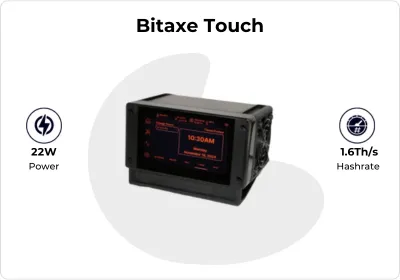
The seller-listed Bitaxe Touch configuration delivers up to 1.6TH/s of SHA-256 mining output. It is reportedly based on a single BM1370 ASIC chip, although the exact board and chip must be confirmed for the delivered unit.
Actual hashrate can vary according to chip quality, ASIC frequency, core voltage, firmware, power-supply stability, fan speed, heatsink design and ambient temperature.
Users should monitor average pool-side hashrate rather than relying only on short dashboard peaks. A small miner submits fewer shares than a large industrial machine, so reported pool hashrate may fluctuate significantly over short periods.
Important operating indicators include:
- Real-time hashrate
- Longer-term average hashrate
- Accepted and rejected shares
- ASIC temperature
- Voltage-regulator temperature
- ASIC frequency
- Core voltage
- Fan speed
- Measured wall power
- Wi-Fi signal quality
- Mining-pool latency
Reduced output may be caused by thermal throttling, unstable power, insufficient cooling, poor Wi-Fi, aggressive tuning, firmware incompatibility or pool interruption.
Bitaxe Touch 13.75J/TH Efficiency

Dividing the seller-listed 22W consumption by 1.6TH/s gives the Bitaxe Touch a calculated efficiency of approximately 13.75J/TH.
This calculation assumes that the miner sustains 1.6TH/s while drawing exactly 22W. Measured wall efficiency may differ because of power-adapter losses, fan consumption, display power, tuning and short-term hashrate fluctuations.
At a continuous 22W load, estimated electricity use is:
- 0.528kWh per day
- 3.696kWh per week
- 15.84kWh per 30-day month
- 192.72kWh per year
Estimated monthly electricity costs are:
- At $0.05/kWh: approximately $0.79
- At $0.10/kWh: approximately $1.58
- At $0.15/kWh: approximately $2.38
- At $0.20/kWh: approximately $3.17
- At $0.30/kWh: approximately $4.75
- At $0.40/kWh: approximately $6.34
These calculations cover only nominal miner consumption. A power adapter with poor conversion efficiency can increase measured wall usage.
Bitcoin mining profitability is not guaranteed. Bitcoin price, network difficulty, block rewards, pool fees, payout thresholds, electricity rates, hardware price, uptime and mining luck all influence results.
Bitaxe Touch Cooling and Noise
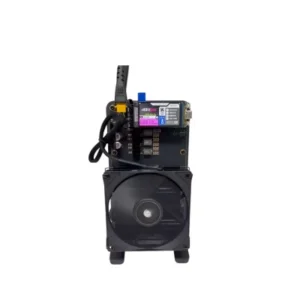
The seller-supplied Bitaxe Touch uses two active cooling fans. These fans move air across the ASIC heatsink, voltage-regulation components, controller and internal enclosure.
The listed 35dB noise rating should be treated as an estimate. Actual sound depends on fan quality, rotation speed, case design, mounting surface, room acoustics and thermal tuning.
Cooling Recommendations
- Keep both cooling fans unobstructed.
- Do not place the miner in a sealed cabinet.
- Use a hard, heat-resistant surface.
- Keep fabric and paper away from airflow openings.
- Monitor ASIC and regulator temperatures.
- Reduce frequency or voltage if temperatures become excessive.
- Clean dust from the fans and heatsinks regularly.
- Replace noisy or failed fans immediately.
- Keep the touchscreen vents and enclosure openings clear.
At 22W, the Bitaxe Touch creates far less heat than an industrial ASIC miner. It can still overheat when ventilation is restricted or aggressive tuning is applied.
Bitaxe Touch Solo Mining and Pool Mining
The Bitaxe Touch can connect to compatible Stratum V1 mining pools. Users may choose regular pool mining or solo-pool mining.
Regular Pool Mining
In a conventional mining pool, the miner submits shares and receives a proportional payout according to the pool’s reward system, fees and payout threshold.
Because 1.6TH/s is very small compared with the total Bitcoin network, regular pool income may be extremely low. Some payout thresholds may take a considerable amount of time to reach.
Solo-Pool Mining
When connected to a solo pool, the Bitaxe Touch attempts to find a valid Bitcoin block. This is commonly called lottery mining because the chance of success is very small and highly unpredictable.
A touchscreen showing live mining progress does not improve the probability of finding a block. Success depends primarily on the miner’s valid hashrate relative to total network difficulty.
Users should purchase the device for learning, decentralization, experimentation or entertainment rather than guaranteed income.
Mineable Coins with Bitaxe Touch

Bitcoin
Bitcoin is the primary cryptocurrency mined by the Bitaxe Touch. The machine performs SHA-256 calculations and submits accepted shares to a compatible pool.
Other technically compatible SHA-256 cryptocurrencies may include Bitcoin Cash, Fractal Bitcoin, eCash, Bitcoin SV and Peercoin where compatible pools, wallets and firmware are available.
Before switching networks, compare mining difficulty, reward structure, pool availability, payout thresholds, wallet support and market liquidity.
For general information about Bitcoin and proof-of-work mining, review the official Bitcoin educational resources.
Bitaxe Touch Setup Guide
- Inspect the miner, touchscreen, fans, heatsink and power connector.
- Confirm that the supplied adapter matches the miner’s 5V input requirement.
- Place the miner on a stable and ventilated surface.
- Prepare a reliable 2.4GHz Wi-Fi network.
- Connect the approved power adapter.
- Power on the miner.
- Follow the touchscreen Wi-Fi setup where supported.
- Alternatively, connect to the temporary Bitaxe setup hotspot.
- Enter the local Wi-Fi network name and password.
- Locate the miner’s local IP address.
- Open AxeOS in a web browser.
- Enter the mining-pool Stratum URL.
- Add the worker name and pool password.
- Enter a Bitcoin payout address where required.
- Save the settings.
- Monitor hashrate, temperature, display status and accepted shares.
Run the Bitaxe Touch at stable default settings before changing frequency, voltage or fan controls.
Bitaxe Touch Firmware and Management
The Bitaxe Touch can use open-source Bitaxe software, including ESP-Miner and the AxeOS web interface. The separate touchscreen controller may run dedicated firmware that communicates with the miner through the Bitaxe Accessory Port.
Depending on the installed version, AxeOS can provide:
- Mining-pool configuration
- Hashrate monitoring
- ASIC temperature monitoring
- Voltage-regulator temperature monitoring
- Fan controls
- Frequency and voltage adjustment
- Wi-Fi configuration
- Firmware updates
- System logs
- Restart and reset controls
Always confirm the exact hardware revision before flashing either the miner or touchscreen. Firmware intended for another board can cause instability or prevent the system from starting correctly.
Review the official ESP-Miner firmware repository, the Bitaxe GT Touch firmware project and the Turbo Touch hardware repository for open-source technical information.
Bitaxe Touch Maintenance
Routine maintenance helps the Bitaxe Touch maintain stable temperatures, consistent hashrate and responsive touchscreen operation.
- Monitor ASIC and voltage-regulator temperatures.
- Check both cooling fans regularly.
- Remove dust from the heatsink and enclosure.
- Clean the touchscreen with a soft, dry cloth.
- Do not spray cleaner directly onto the display.
- Inspect the 5V connector for heat damage.
- Check the power adapter and cable.
- Compare dashboard and pool-side hashrate.
- Review rejected shares and Wi-Fi performance.
- Install only compatible firmware.
- Back up pool and tuning settings.
- Disconnect power before cleaning the unit.
Do not use liquid cleaners on the circuit board. When using compressed air, prevent the cooling fans from spinning uncontrollably.
Why Choose the Bitaxe Touch?
The Bitaxe Touch may suit Bitcoin enthusiasts who want an interactive home miner with live operating data, open-source software and low electrical consumption.
- Up to 1.6TH/s seller-listed hashrate
- Approximately 22W power consumption
- Approximately 13.75J/TH calculated efficiency
- 800 × 480 touchscreen display
- Live hashrate and temperature monitoring
- Touch-based controls on supported firmware
- Open-source ESP-Miner ecosystem
- AxeOS browser management
- Wi-Fi pool connectivity
- Pool and solo-mining support
- Compact desktop design
- Much lower power demand than industrial ASIC miners
The main limitations are the extremely low solo-mining probability, seller-dependent build quality, configuration differences, Wi-Fi dependence, seller-specific warranty and risks associated with unsupported tuning.
Browse more Bitcoin ASIC miners to compare the Bitaxe Touch with other home miners and larger SHA-256 systems.
Bitaxe Touch Frequently Asked Questions
What is the Bitaxe Touch?
The Bitaxe Touch is an open-source desktop Bitcoin miner that combines Bitaxe mining hardware with an interactive touchscreen.
What is its hashrate?
The seller-supplied configuration is rated at up to 1.6TH/s.
How much power does it consume?
The supplied specification lists approximately 22W.
What is its calculated efficiency?
At 1.6TH/s and 22W, the calculated efficiency is approximately 13.75J/TH.
Which ASIC chip does it use?
The 1.6TH/s version is commonly listed with a BM1370 ASIC, but the exact chip should be confirmed before purchase.
What is the touchscreen resolution?
The display resolution is listed as 800 × 480 pixels.
What information can the touchscreen show?
Supported firmware may show hashrate, temperatures, power use, pool status, Bitcoin price, block height, recent blocks and Wi-Fi information.
Does the touchscreen increase hashrate?
No. It provides monitoring and controls but does not perform SHA-256 mining.
Does the Bitaxe Touch use Ethernet?
Standard Bitaxe hardware commonly uses Wi-Fi. Some custom builds may add other network options, so the exact unit should be checked.
Does it require a computer?
No. After configuration, the miner can operate independently using its onboard controller.
Can it mine Bitcoin?
Yes. Bitcoin is the primary cryptocurrency associated with the miner.
Can it mine Bitcoin Cash?
Yes, through a compatible SHA-256 mining pool.
Can it solo mine?
Yes. It can connect to a compatible solo pool, but the probability of finding a Bitcoin block is extremely low.
Will it generate steady passive income?
No. Pool earnings may be very small, and solo mining may never produce a block.
How loud is it?
The seller lists approximately 35dB, but actual noise depends on fan speed, enclosure and room conditions.
What voltage does it require?
The supplied configuration lists 5V DC. A compatible high-current power adapter is required.
Does it connect directly to household mains?
No. It requires an appropriate AC-to-DC adapter.
How much does it weigh?
The seller lists approximately 600g or 0.6kg.
How much electricity does it use daily?
At 22W, continuous operation consumes approximately 0.528kWh per day.
Can the Bitaxe Touch be overclocked?
Compatible firmware may allow tuning, but overclocking increases heat, power consumption and hardware risk.
Does it include a 180-day warranty?
The supplied seller lists 180 days, but warranty coverage is seller-specific and should be confirmed before purchase.
Is the Bitaxe Touch profitable?
Profitability is not guaranteed and depends on Bitcoin price, network difficulty, electricity, pool terms, hardware cost and mining luck.
Buy Bitaxe Touch Bitcoin Mining Hardware
The Bitaxe Touch combines seller-listed output of up to 1.6TH/s with approximately 22W power consumption, a calculated efficiency of 13.75J/TH and an 800 × 480 touchscreen. Its compact design, open-source firmware, Wi-Fi connectivity and live monitoring features make it an appealing option for Bitcoin enthusiasts and home-mining experiments.
Before ordering, confirm the ASIC chip, board revision, power connector, adapter amperage, fan count, sustained hashrate, display firmware, network connection and warranty. Visit Hash Titans to compare the Bitaxe Touch with other home and professional Bitcoin mining machines.
Reviews
There are no reviews yet.