
Description
“`html
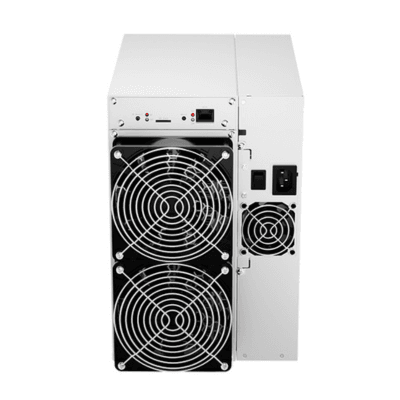
Iceriver KS2 2TH/s Kaspa ASIC Miner
The Iceriver KS2 is a dedicated kHeavyHash ASIC miner designed for Kaspa mining. It delivers approximately 2TH/s, equal to 2,000GH/s, while consuming around 1,200W.
With calculated efficiency of approximately 600J/TH, equal to 0.6J/GH, the Iceriver KS2 doubles the nominal hashrate and power consumption of the KS1 while maintaining similar published efficiency.
The Iceriver KS2 is intended for miners who need more output than compact KS0-series devices but do not want the substantially higher electrical demand of larger Kaspa mining systems. Its Ethernet connection, integrated power supply and air-cooled chassis make it suitable for workshops, mining rooms and small professional facilities.
The miner requires a high-voltage AC connection and uses a C14-specification power cord. IceRiver states that the power cord is not included, so buyers must prepare a compatible cable before installation.
Before purchasing an Iceriver KS2, compare the equipment price, electricity rate, Kaspa network difficulty, pool fees, shipping charges, customs costs, warranty coverage and cooling requirements. Mining income and return on investment are never guaranteed.
Browse our collection of Kaspa miners, explore additional ASIC miners, or visit Hash Titans for cryptocurrency-mining hardware.
Iceriver KS2 Key Features
The Iceriver KS2 combines 2TH/s of dedicated Kaspa mining power with moderate industrial electricity consumption and Ethernet-based management.
- Manufacturer: IceRiver
- Model: KS2
- Full product name: Iceriver KS2
- Miner type: Kaspa ASIC miner
- Mining algorithm: kHeavyHash
- Primary cryptocurrency: Kaspa
- Rated hashrate: 2TH/s
- Equivalent hashrate: 2,000GH/s
- Rated power consumption: 1,200W
- Calculated efficiency: Approximately 600J/TH
- Equivalent efficiency: Approximately 0.6J/GH
- Network interface: Ethernet
- Input voltage: 170–300V AC
- Power connection: C14 specification
- Power cord included: No
- Miner dimensions: Approximately 370 × 195 × 290mm
- Net weight: Approximately 12.5kg
- Gross weight: Approximately 14.9kg
- Cooling system: Industrial air cooling
- Internal fan model: 12038
- Operating temperature: Approximately 0°C to 35°C
- Operating humidity: Approximately 10% to 90%, non-condensing
- Launch period: March 2023
- Recommended use: Mining rooms, workshops and small professional facilities
Iceriver KS2 Specifications
| Manufacturer | IceRiver |
|---|---|
| Model | KS2 |
| Full product name | Iceriver KS2 |
| Miner type | Kaspa ASIC miner |
| Mining algorithm | kHeavyHash |
| Rated hashrate | 2TH/s |
| Equivalent hashrate | 2,000GH/s |
| Rated power consumption | 1,200W |
| Calculated efficiency | Approximately 600J/TH or 0.6J/GH |
| Network connection | Ethernet |
| Input voltage | 170–300V AC |
| Power-cord specification | C14 |
| Power cord included | No |
| Miner dimensions | Approximately 370 × 195 × 290mm |
| Net weight | Approximately 12.5kg |
| Gross weight | Approximately 14.9kg |
| Cooling system | Industrial air cooling |
| Internal fan model | 12038 |
| Operating temperature | Approximately 0°C to 35°C |
| Operating humidity | Approximately 10% to 90%, non-condensing |
| Primary supported network | Kaspa |
| Official manual | Shared KS1 and KS2 manual |
| Warranty | 180 days for eligible original direct purchasers |
Specification note: The Iceriver KS2 is rated at approximately 2TH/s and 1,200W. This produces a calculated nominal efficiency of approximately 600J/TH.
The original August 2023 release date has been replaced with March 2023 because IceRiver introduced the KS1 and KS2 during that period.
Iceriver KS2 Kaspa Mining Performance
The Iceriver KS2 performs approximately two trillion kHeavyHash calculations every second under nominal operating conditions.
Actual local hashrate can vary because of firmware, temperature, voltage stability, fan performance, production tolerances and machine condition. Pool-side accepted hashrate may also move above or below the local reading because of network latency and share timing.
Factors That Affect Mining Output
- Firmware version
- Ambient temperature
- Airflow quality
- Fan condition
- Input-voltage stability
- Ethernet reliability
- Pool-server distance
- Rejected shares
- Stale shares
- Miner uptime
Operators should compare the local Iceriver KS2 dashboard with average accepted pool-side hashrate over several hours rather than relying on short-term peaks.
Important Monitoring Values
- Current hashrate
- Average pool-side hashrate
- Accepted shares
- Rejected shares
- Stale shares
- Hashboard status
- Miner temperature
- Fan speed
- Ethernet uptime
- Measured wall power
Iceriver KS2 Power Efficiency
The nominal efficiency of the Iceriver KS2 is calculated as follows:
1,200W ÷ 2TH/s = approximately 600J/TH
The same efficiency can be expressed as approximately 0.6J/GH.
This published efficiency is similar to the KS1 because the Iceriver KS2 provides approximately twice the hashrate while using approximately twice the power.
Efficiency measures power used per unit of hashrate. It does not guarantee mining income or a specific return period.
When comparing the Iceriver KS2 with other miners, consider:
- Total hashrate
- Power efficiency
- Hardware price
- Electricity cost
- Cooling demand
- Pool fees
- Noise output
- Power-cord requirements
- Warranty support
- Expected useful life
Iceriver KS2 Electricity Consumption
At a continuous nominal load of 1,200W, estimated electricity consumption is:
- 28.8kWh per day
- 201.6kWh per week
- 864kWh per 30-day month
- 10,512kWh per year
Estimated monthly electricity costs are:
- At $0.05/kWh: approximately $43.20
- At $0.08/kWh: approximately $69.12
- At $0.10/kWh: approximately $86.40
- At $0.15/kWh: approximately $129.60
- At $0.20/kWh: approximately $172.80
- At $0.30/kWh: approximately $259.20
- At $0.40/kWh: approximately $345.60
Actual wall consumption may differ because of input voltage, power-supply efficiency, temperature and operating condition.
Use a suitable wall meter or monitored power-distribution unit to measure the actual electricity use of the Iceriver KS2.
Iceriver KS2 Profitability Factors
The profitability of the Iceriver KS2 changes with Kaspa network conditions and operating expenses.
Important factors include:
- Current KAS market price
- Kaspa network difficulty
- Total network hashrate
- Block-reward reductions
- Pool fees
- Rejected-share rate
- Electricity price
- Hardware purchase cost
- Shipping and import costs
- Cooling and ventilation expenses
Daily Electricity-Cost Examples
- At $0.05/kWh: approximately $1.44 per day
- At $0.08/kWh: approximately $2.30 per day
- At $0.10/kWh: approximately $2.88 per day
- At $0.15/kWh: approximately $4.32 per day
- At $0.20/kWh: approximately $5.76 per day
- At $0.30/kWh: approximately $8.64 per day
Estimate net income by subtracting electricity, pool fees, ventilation and other operating costs from current gross mining revenue.
Do not rely on a fixed daily earnings estimate when evaluating the Iceriver KS2. Kaspa price, network hashrate, rewards and difficulty can change.
Iceriver KS2 Kaspa Compatibility
The Iceriver KS2 is designed for the kHeavyHash proof-of-work algorithm used by Kaspa.
Kaspa is a proof-of-work blockDAG network. Current Kaspa mining is performed primarily with specialized ASIC hardware rather than CPUs or GPUs.
The Iceriver KS2 is not designed for unrelated algorithms such as:
- SHA-256 used by Bitcoin
- Scrypt used by Litecoin and Dogecoin
- RandomX used by Monero
- BLAKE3 used by Alephium
- NexaPow used by Nexa
- SHA512256d used by Radiant
Learn more through the official Kaspa website, review the Kaspa mining documentation, and download the official IceRiver KS1 and KS2 manual.
Iceriver KS2 Pool and Solo-Mining Setup
The Iceriver KS2 connects to compatible Kaspa mining pools through wired Ethernet.
Pool configuration generally requires:
- A compatible Kaspa Stratum address
- A Kaspa wallet address or pool account
- A worker name
- A pool password
- Secondary and tertiary backup pools
Pool Selection Checklist
- Kaspa ASIC compatibility
- Pool fee
- Payout method
- Minimum payout threshold
- Regional server availability
- Historical uptime
- Worker-monitoring features
- Customer support
- Pool hashrate concentration
After configuring the Iceriver KS2, verify that accepted shares appear and that average pool-side hashrate remains reasonably close to the rated performance.
Solo mining is technically possible, but pool mining generally provides more frequent payouts for miners representing a small share of total network hashrate.
Iceriver KS2 Electrical Requirements
The Iceriver KS2 requires approximately 170–300V AC and should not be connected to an unsuitable low-voltage outlet.
Approximate current at the nominal 1,200W load is:
- Approximately 7.06A at 170V
- Approximately 5.45A at 220V
- Approximately 5.22A at 230V
- Approximately 5A at 240V
- Approximately 4A at 300V
Actual current may vary because of power factor, PSU efficiency, operating temperature and machine condition.
Electrical Preparation
- Properly grounded high-voltage outlet
- Suitable circuit breaker
- Cable rated for continuous load
- C14-compatible power cord
- Surge protection
- Secure power connections
- Accessible emergency disconnect
- Compliance with local electrical codes
IceRiver states that the power cord is not included. Prepare a suitable C14-compatible cable before installing the Iceriver KS2.
A qualified electrician should inspect the circuit when there is uncertainty about voltage, grounding or breaker capacity.
Iceriver KS2 Cooling and Noise
The Iceriver KS2 converts approximately 1,200W of electrical power into continuous heat. It therefore requires reliable intake airflow and an effective exhaust path.
Although the KS1 and KS2 were originally promoted with a lower noise figure than many larger industrial ASIC miners, actual sound depends on fan speed, room temperature, dust buildup and placement.
Cooling Recommendations
- Keep intake and exhaust openings unobstructed.
- Place the miner on a stable rack or shelf.
- Avoid sealed cabinets and boxes.
- Separate warm exhaust from cool intake air.
- Provide additional room ventilation where necessary.
- Keep ambient temperature below 35°C.
- Remove dust from fans and heatsinks.
- Keep power and network cables away from exhaust heat.
- Avoid moisture and condensation.
- Monitor temperature continuously.
IceRiver identifies the internal fan used by the Iceriver KS2 as model 12038.
Iceriver KS2 Installation Guide
- Inspect the package for shipping damage.
- Confirm that the factory label states KS2.
- Verify the 2TH/s and 1,200W ratings.
- Confirm that the electrical supply is within 170–300V AC.
- Obtain a compatible C14 power cord.
- Place the miner in a ventilated location.
- Connect the Ethernet cable.
- Connect the power cord securely.
- Power on the miner.
- Locate its IP address through the router or IceRiver tool.
- Open the miner’s web interface.
- Change the default password where supported.
- Enter the primary Kaspa pool address.
- Add the wallet and worker details.
- Configure backup pools.
- Save the configuration.
- Wait for accepted shares to appear.
- Monitor hashrate, temperature, fans and Ethernet stability.
During initial operation, monitor the Iceriver KS2 for overheating, missing hashboards, unstable output, repeated restarts, unusual fan noise and hot electrical connections.
Iceriver KS2 Maintenance
Routine maintenance helps the Iceriver KS2 maintain stable cooling, Ethernet connectivity and accepted pool performance.
- Inspect intake and exhaust openings.
- Remove accumulated dust carefully.
- Check the internal fan.
- Monitor miner and hashboard temperatures.
- Inspect the power cord and connector.
- Check Ethernet cables and network switches.
- Compare local and pool-side hashrate.
- Review rejected and stale shares.
- Back up settings before firmware updates.
- Use only firmware intended for the KS2.
- Disconnect power before cleaning.
Do not install firmware intended for the KS1, KS2 Lite, KS3 or another IceRiver model unless the manufacturer explicitly confirms compatibility.
Official software is available through the IceRiver firmware page. Incompatible or unofficial firmware may damage the miner and affect warranty coverage.
Iceriver KS2 Model Comparison
The Iceriver KS2 sits between the KS1 and higher-output KS3-series miners.
- KS0 Pro: Approximately 200GH/s at 100W
- KS0 Ultra: Approximately 400GH/s at 100W
- KS1: Approximately 1TH/s at 600W
- KS2: Approximately 2TH/s at 1,200W
The Iceriver KS2 delivers twice the nominal hashrate of the KS1 while consuming twice the nominal power.
Compared with the KS0 Ultra, the KS2 delivers approximately five times the hashrate while consuming twelve times the nominal power.
Always verify the exact product label because the KS2 and KS2 Lite are separate models with different specifications, cooling systems and intended use.
Iceriver KS2 Buying Considerations
Before purchasing an Iceriver KS2, compare the total delivered cost and confirm the condition of the machine.
Check Before Ordering
- Exact KS2 model label
- 2TH/s hashrate rating
- 1,200W power specification
- New, used or refurbished condition
- C14 power-cord inclusion
- 170–300V electrical compatibility
- Current firmware version
- Hashboard condition
- Fan condition
- Ethernet functionality
- Mining-pool compatibility
- Seller warranty
- Return policy
- Shipping insurance
- Import duties and taxes
Be cautious with sellers promising guaranteed daily profits. Kaspa mining revenue depends on token price, network difficulty, rewards, electricity and machine uptime.
Contact Hash Titans to check current availability, package contents, shipping details and purchase support for the Iceriver KS2.
Iceriver KS2 Warranty and Shipping
IceRiver provides a 180-day warranty from the shipment date for eligible original direct purchasers. When the machine is resold, warranty responsibility generally transfers to the reseller.
- Confirm whether the miner is in stock.
- Check the expected dispatch date.
- Verify the warehouse location.
- Confirm that the power cord is not included.
- Review shipping-insurance coverage.
- Check customs duties and import taxes.
- Ask who handles warranty claims.
- Confirm whether warranty coverage transfers after resale.
- Inspect the package immediately after delivery.
- Photograph shipping damage before powering on.
Unauthorized disassembly, unsuitable electrical equipment, incorrect firmware or operation outside the manufacturer’s requirements may affect warranty eligibility.
Iceriver KS2 Frequently Asked Questions
What is the Iceriver KS2?
The Iceriver KS2 is a kHeavyHash ASIC miner designed for Kaspa mining.
What is its rated hashrate?
The miner is rated at approximately 2TH/s, equal to 2,000GH/s.
How much power does it use?
The nominal power rating is approximately 1,200W.
What is its calculated efficiency?
At 2TH/s and 1,200W, calculated efficiency is approximately 600J/TH or 0.6J/GH.
Which algorithm does it mine?
It mines the kHeavyHash proof-of-work algorithm used by Kaspa.
Can it mine Bitcoin?
No. Bitcoin uses SHA-256 rather than kHeavyHash.
What voltage does it require?
The commonly specified input range is approximately 170–300V AC.
Does it include a power cord?
No. IceRiver states that the power cord must be purchased separately.
Which power connection does it use?
The Iceriver KS2 uses a C14-specification power connection.
Does it support Wi-Fi?
No standard Wi-Fi interface is listed. It uses wired Ethernet.
What are its dimensions?
The miner measures approximately 370 × 195 × 290mm.
How much does it weigh?
Its net weight is approximately 12.5kg, with packaged gross weight around 14.9kg.
Which fan does it use?
IceRiver identifies the internal fan as model 12038.
What is its operating temperature?
The commonly specified operating range is approximately 0°C to 35°C.
How much electricity does it use daily?
At 1,200W, continuous operation consumes approximately 28.8kWh per day.
Is the Iceriver KS2 suitable for home mining?
Its electricity demand is moderate compared with larger industrial miners, but heat, fan noise, Ethernet and high-voltage power make a dedicated mining area preferable.
Is the Iceriver KS2 profitable?
Profitability is not guaranteed. Kaspa price, network difficulty, pool fees, electricity and hardware cost all affect results.
Can it solo mine Kaspa?
Kaspa supports solo mining, but pool mining generally provides more frequent payouts for miners with a relatively small share of network hashrate.
Is the KS2 the same as the KS2 Lite?
No. The KS2 and KS2 Lite are separate models with different specifications and intended operating environments.
Can I use third-party firmware?
Third-party firmware may affect performance, power consumption and warranty coverage. Use official firmware intended for the KS2.
Where can I buy the Iceriver KS2?
You can contact Hash Titans to confirm current availability, package contents, shipping options and seller support.
Buy Iceriver KS2 Kaspa Mining Hardware
The Iceriver KS2 delivers approximately 2TH/s of kHeavyHash performance while consuming around 1,200W. Its Ethernet management, industrial air cooling and calculated 600J/TH efficiency make it suitable for workshops, mining rooms and small professional operations.
Before ordering, confirm the exact model, power cord, electrical compatibility, firmware, mining-pool support, warranty and shipping terms. Calculate operating costs using your actual electricity rate and current Kaspa network conditions.
Visit Hash Titans to compare the Iceriver KS2 with other Kaspa and cryptocurrency-mining systems.
Reviews
There are no reviews yet.